
Introduction
Getting your classical recordings rejected by Apple Music Classical is frustrating—especially when the issue is a misformatted opus number or incorrectly structured movement title. Apple Music Classical's 2023 launch opened access to millions of dedicated classical listeners, but unlike pop or rock distribution, classical releases require meticulous metadata formatting.
Composer names must follow standardized conventions, work titles need precise opus/catalog numbers, and movement structures require exact Roman numeral formatting.
This guide covers the exact preparation steps, metadata requirements, and upload process for distributing classical music to Apple Music Classical. Whether you're releasing your first chamber recording or managing an orchestral catalog, you'll learn how to avoid the formatting errors that cause rejections and delays.
TLDR
- Choose distributors with explicit classical music support for Apple Music Classical delivery
- Metadata precision matters—standardized composer names, opus numbers, and role credits required
- One upload reaches both Apple Music and Apple Music Classical automatically when properly formatted
- Prepare 24-bit/96kHz files with wide dynamic range preservation (avoid pop music compression)
- Delivery takes 7-14 days post-approval, up to 30 days for complex classical releases
How to Distribute Classical Music to Apple Music
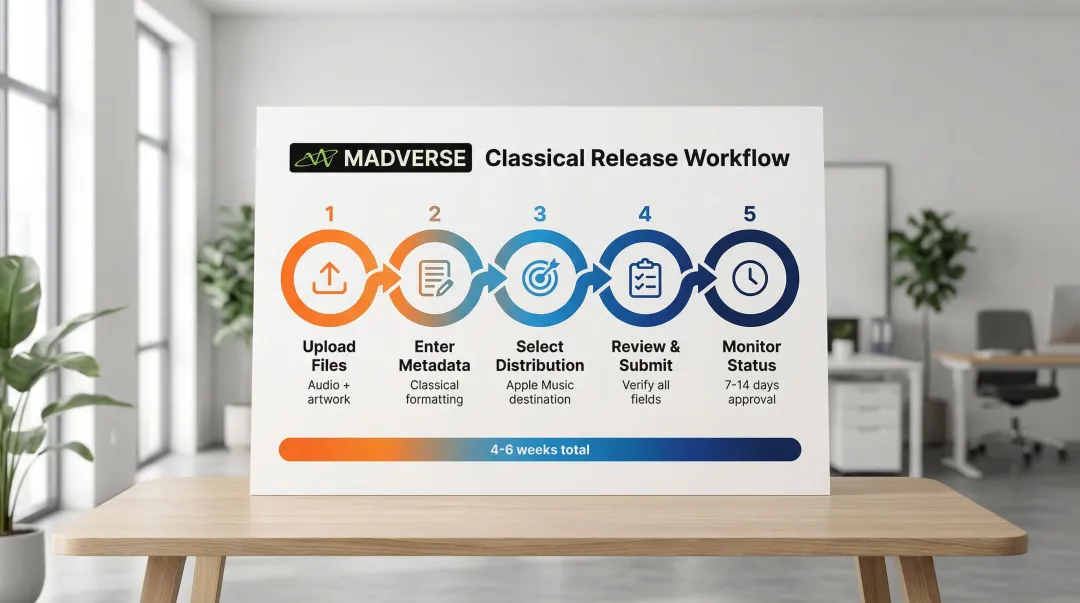
Step 1: Choose a Distributor That Supports Classical Music
Not all distributors can deliver classical music to Apple Music. DistroKid, CD Baby, and TuneCore explicitly state they cannot support classical releases due to Apple's complex metadata requirements. Your distributor must handle specialized XML data structures that standard pop/rock systems don't support.
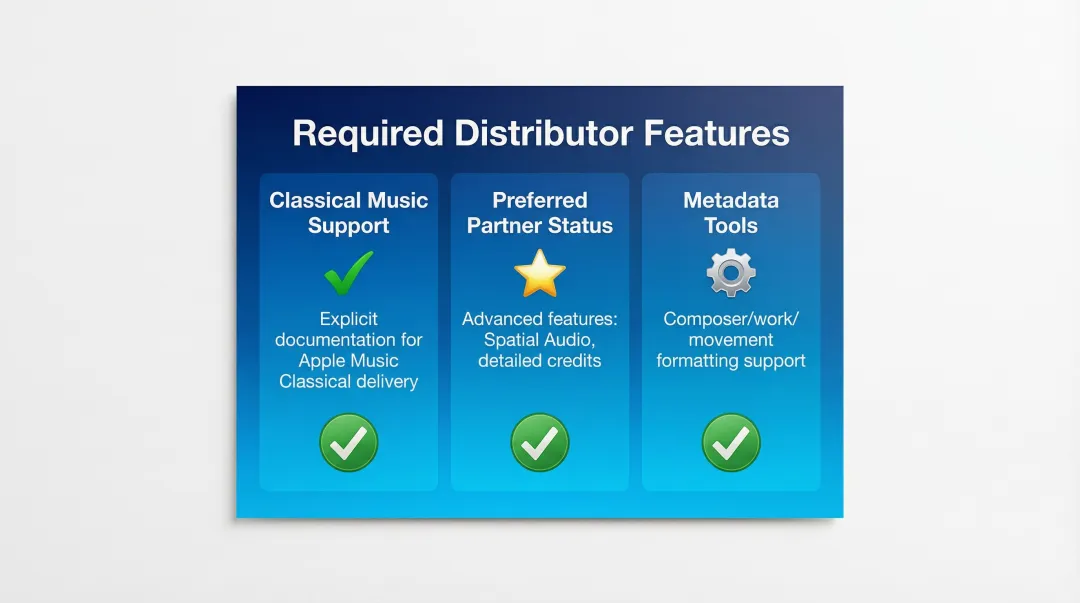
Look for these distributor qualifications:
- Explicit documentation confirming classical music delivery to Apple Music
- "Preferred Partner" status with Apple Music for advanced features like Spatial Audio and detailed credits
- Classical-specific metadata tools supporting composer/work/movement formatting
Several established distributors meet these standards, including FUGA, Symphonic, and Believe. Services like Madverse offer classical music distribution with attention to accurate metadata and proper categorization, plus features like Dolby Atmos distribution and 95% royalty retention on premium plans.
Step 2: Prepare Your Classical Music Files
Once you've selected a qualified distributor, focus on preparing your audio files. Classical music demands higher quality standards than typical pop releases due to its wide dynamic range.
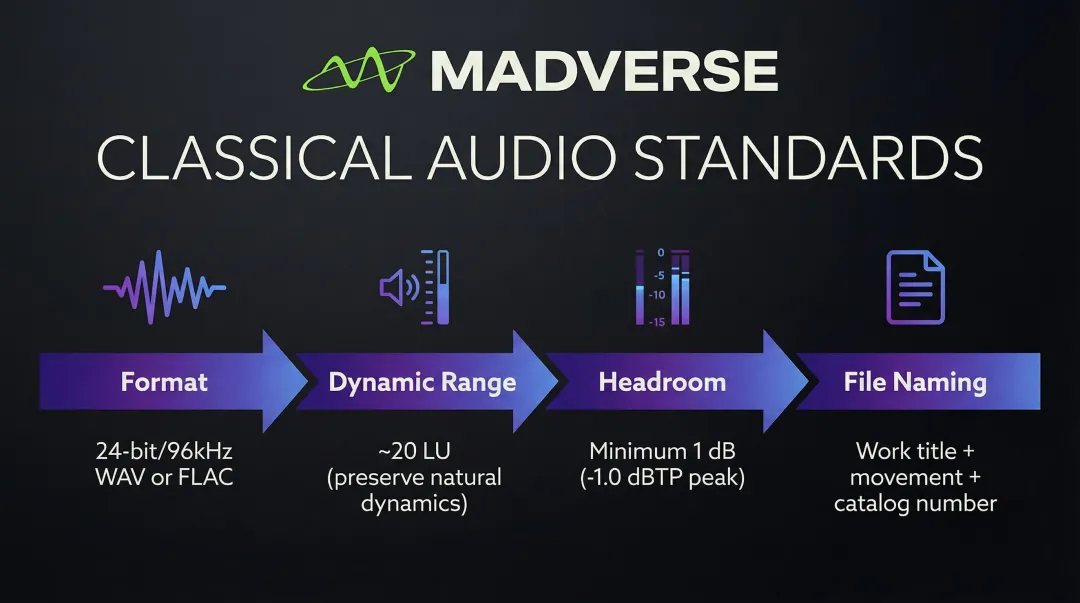
Technical specifications:
- Format: 24-bit/96kHz WAV or FLAC files (16-bit/44.1kHz is accepted but 24-bit qualifies for Hi-Res Lossless badging)
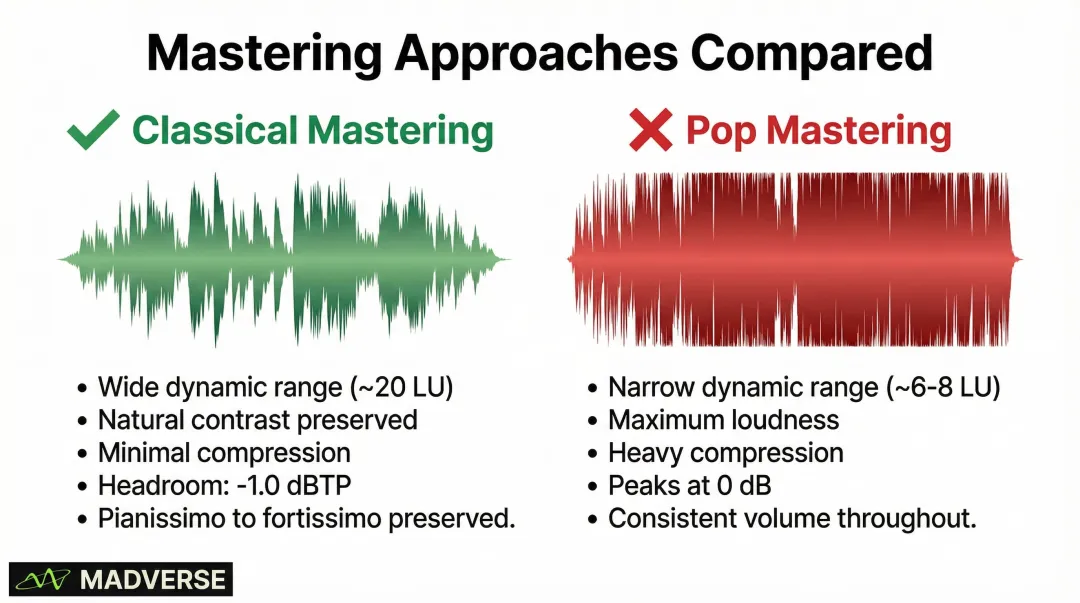
- Dynamic range: Preserve natural dynamics—avoid loudness normalization and over-compression used in pop mastering
- Headroom: Maintain at least 1 dB headroom (peak at -1.0 dBTP) to prevent clipping during encoding
- File naming: Use clear conventions including work title, movement number, and catalog number for upload organization
Ensure your mastering preserves the contrast between pianissimo and fortissimo passages. Classical recordings should target approximately 20 LU (Loudness Units) of dynamic range per EBU R128 guidelines, significantly wider than compressed pop masters.
Step 3: Format Your Metadata According to Classical Music Standards
Improper metadata formatting is the leading cause of classical release rejections. Apple enforces strict conventions that differ fundamentally from popular music.
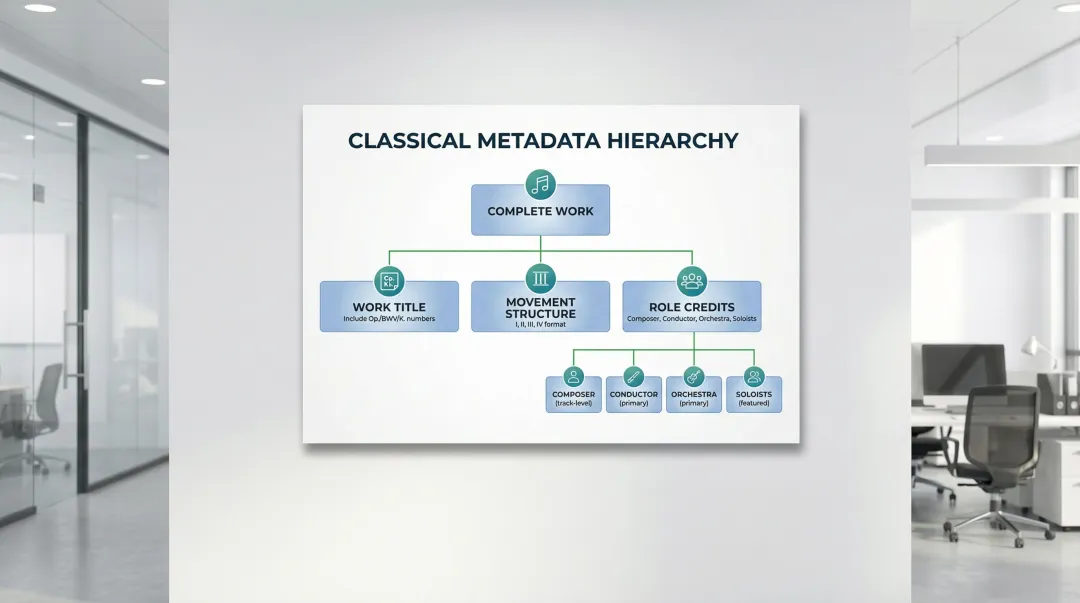
Composer names:
- Use full standardized format: "Wolfgang Amadeus Mozart" not "W.A. Mozart" or "Mozart, W.A."
- Verify spelling against authoritative sources like Grove Music Online or Library of Congress
- Maintain identical spelling across all tracks
Work titles:
- Include complete information: "Symphony No. 5 in C Minor, Op. 67"
- Add catalog numbers with proper prefixes (BWV for Bach, K. for Mozart, Op. for Opus numbers)
- Include key signatures when standard
Movement formatting:
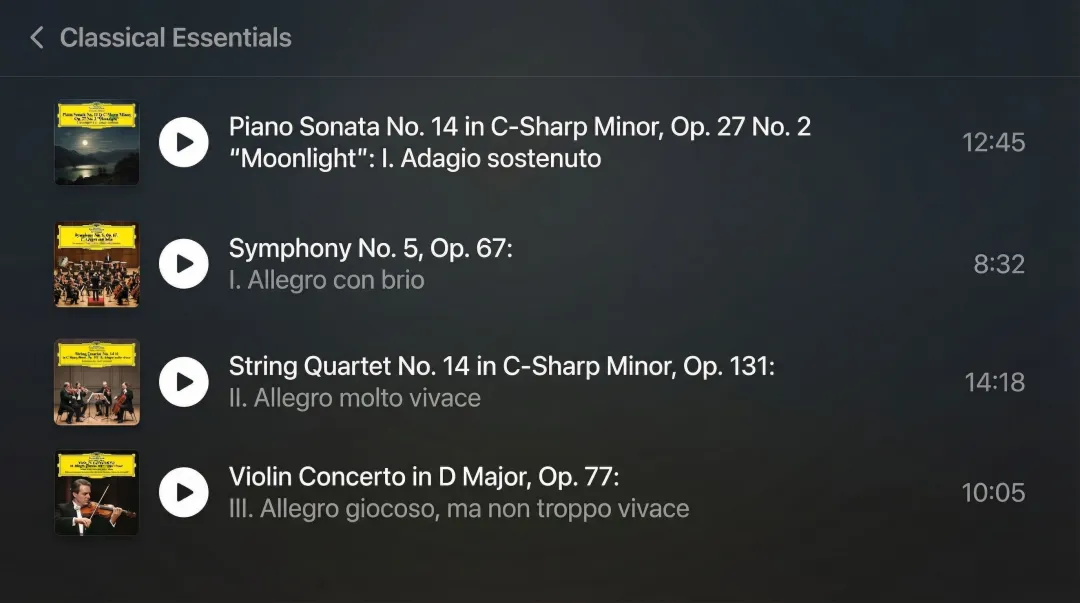
- Structure: "Work Title: Movement Number. Movement Title and Tempo"
- Example: "Piano Sonata No. 14, Op. 27 No. 2: I. Adagio sostenuto"
- Use Roman numerals (I, II, III, IV) for movement numbers
- Include tempo markings in original language (Allegro, Andante, Presto)
Role credits:
- Composer (track-level credit)
- Conductor (primary artist)
- Orchestra/ensemble name (primary artist)
- Featured soloists with instruments specified
- Recording engineer, producer, venue, and date when applicable
Step 4: Upload Your Release Through Your Distributor's Platform
Log into your distributor's platform and initiate a new release with these specifications:
- Select "Classical" as primary genre - this triggers routing to Apple Music Classical
- Upload audio files meeting technical specifications
- Add artwork (minimum 3000x3000px, RGB color space, JPEG or PNG format)
- Enter all metadata fields with classical-specific formatting
- Select Apple Music/iTunes as distribution destination (automatically includes Apple Music Classical)
Double-check that artwork contains no prohibited elements: no Apple Music logos, pricing information, format references ("Dolby Atmos"), or URLs.
Step 5: Review, Submit, and Monitor Approval Status
Before submission, verify every metadata field:
- Composer names match authoritative sources exactly
- Work titles include complete opus/catalog numbers
- Movement formatting follows "Work: Roman Numeral. Title" structure
- Role credits are complete and accurately assigned
- Artwork meets technical and content requirements
Submit for moderation and monitor your distributor's dashboard. Classical releases typically go live within 7-14 days of approval, though complex metadata may extend this to 30 days. Plan release dates accordingly, allowing 4-6 weeks from submission to publication.
When Should You Distribute to Apple Music Classical?
Apple Music Classical targets traditional classical repertoire—music from the Western art music tradition spanning roughly 800 A.D. to present. Not all orchestral or instrumental music qualifies.
Ideal use cases:
- Standard classical repertoire (Baroque, Classical, Romantic, Modern periods)
- Orchestral works, symphonies, concertos
- Chamber music (string quartets, piano trios, wind ensembles)
- Solo instrumental classical pieces (piano sonatas, violin partitas)
- Operatic recordings and art song cycles
- Contemporary compositions following Western art music traditions
When standard Apple Music is more appropriate:
- Film scores and soundtracks (use "Soundtrack" genre)
- Classical crossover blending popular and classical styles
- New Age or ambient music with classical influences
- Video game scores
- Contemporary instrumental music outside the classical tradition
Proper categorization ensures your music reaches the right audience.
Classical listeners search by composer, work, and catalog number. Apple Music Classical prioritizes these search features, while standard Apple Music emphasizes genre and artist name instead.
What You Need Before Distributing Classical Music
Preparation directly impacts approval rates and delivery speed. Gather these elements before beginning your upload.
Distributor Account with Classical Music Support
Verify your distributor clearly supports classical delivery to Apple Music. Contact their support team if documentation is unclear—don't assume classical support is included. According to research, DistroKid states "DistroKid does not currently deliver Classical releases to iTunes/Apple Music," while CD Baby confirms they're "currently unable to send classical releases to iTunes and Apple Music."
Apple Music Preferred Partners like FUGA, Symphonic, and Believe offer the advanced metadata capabilities classical music requires.
High-Quality Audio Files and Proper Mastering
Once you've selected a compatible distributor, prepare your audio files to Apple's technical standards. Use 24-bit/96kHz WAV or FLAC files with mastering appropriate for classical music's dynamic range.
Apple Digital Masters specifications require native resolution (no upsampling), proper headroom (peaks at -1.0 dBTP), and no audible clipping.
Classical mastering differs from pop mastering. Preserve the natural contrast between quiet and loud passages rather than compressing everything to maximum loudness. The EBU R128 standard recommends approximately 20 LU of dynamic range for classical material.
Complete and Accurate Metadata
Compile all required information before starting your upload:
- Standardized composer names (verify against Grove Music Online or IMSLP)
- Work titles with opus/catalog numbers
- Movement titles with tempo markings
- Key signatures
- Instrumentation details
- Performance date and venue (if applicable)
- Role credits: composer, conductor, orchestra, soloists, recording engineer, producer
Compliant Artwork
Create album artwork meeting Apple Music specifications:
- Minimum 3000x3000 pixels
- RGB color space
- JPEG or PNG format
- No Apple Music logos, pricing, format references, or URLs
- No marketing text ("New Release," "Limited Edition")
Key Metadata Requirements for Classical Music
Classical metadata follows different conventions than popular music. According to Apple's guidelines, improper formatting is the leading cause of release rejections and editorial suppression.
Focus on five critical areas: composer names, work titles with catalog numbers, movement formatting, performer role credits, and artist designations.
Composer Name Formatting
Use full standardized names consistently across all tracks:
- ✅ "Ludwig van Beethoven"
- ❌ "Beethoven, L.v."
- ❌ "L. Beethoven"
Verify spelling against authoritative sources like Baker's Biographical Dictionary of Musicians, The New Grove Dictionary of Music and Musicians, or the International Music Score Library Project (IMSLP). Inconsistent spelling across tracks will trigger rejection.
Work Title and Opus/Catalog Number Structure
Complete work titles must include catalog numbers:
- "Symphony No. 5 in C Minor, Op. 67" (Beethoven)
- "The Well-Tempered Clavier, Book I, BWV 846-869" (Bach)
- "Piano Concerto No. 21 in C Major, K. 467" (Mozart)
- "The Four Seasons, Op. 8, RV 269" (Vivaldi)
Common catalog systems include BWV (Bach-Werke-Verzeichnis for J.S. Bach), K. (Köchel-Verzeichnis for Mozart), Op. (Opus number for various composers), Hob. (Hoboken-Verzeichnis for Haydn), and RV (Ryom-Verzeichnis for Vivaldi).
Movement Formatting in Track Titles
Structure individual tracks as: "Work Title: Movement Number. Movement Title and Tempo"
Examples:
- "Symphony No. 5 in C Minor, Op. 67: I. Allegro con brio"
- "Piano Sonata No. 14, Op. 27 No. 2: I. Adagio sostenuto"
- "String Quartet No. 14 in C-Sharp Minor, Op. 131: II. Allegro molto vivace"
Use Roman numerals (I, II, III, IV) for movement numbers and include tempo markings in their original language when standard practice.
Once your titles and movements are formatted correctly, the next step is assigning proper performer credits.
Role Credits for Classical Performers
Assign roles accurately:
- Composer: Track-level credit (cannot be marked "Primary" unless also performing)
- Primary artists: Conductor, orchestra/ensemble, featured soloists
- Secondary credits: Recording engineer, producer, venue, recording date
Don't mark individual ensemble members as Primary unless they perform as soloists. In an orchestral recording, the conductor and orchestra receive Primary designation, while the composer gets a track-level credit.
Album Artist vs. Track Artist Distinction
Set the primary performer (conductor, ensemble, or soloist) as the album artist for consistency. Use track-level artist credits to highlight different performers on specific movements while maintaining album coherence.
For example, in a recording of multiple piano concertos with different soloists but the same orchestra and conductor, the conductor and orchestra serve as album artists, while individual soloists receive track-level Primary designation.
Common Issues and How to Fix Them
After preparing your submission, watch for common pitfalls. Classical music releases face higher rejection rates due to metadata complexity, but most issues are preventable.
Metadata Formatting Rejections
Metadata errors cause most rejections. Common problems include incorrect composer name spelling, missing opus/catalog numbers, inconsistent formatting across tracks, and generic movement titles like "Track 1" instead of "I. Allegro."
How to avoid rejections:
- Cross-reference composer names against Grove Music Online, IMSLP, or Baker's Biographical Dictionary
- Follow the "Work Title: Movement Number. Movement Title" format consistently
- Include appropriate catalog numbers (BWV, K., Op., etc.)
- Verify spelling and formatting across all tracks before submission
Audio Quality Issues
Classical recordings often face rejection for clipping during loud passages or excessive compression destroying dynamic range.
Apple Digital Masters guidelines require proper headroom and no audible distortion. Re-master with classical-specific standards prioritizing dynamic range preservation over loudness.
Technical requirements:
- Leave at least 1 dB headroom
- Avoid compression that reduces dynamic contrast
- Ensure no clipping during loud passages
- Target approximately 20 LU dynamic range per EBU R128 standards
Distributor Compatibility Problems
If your release is rejected or doesn't appear on Apple Music Classical after approval, your distributor may not support classical delivery despite general Apple Music access.
Fix: Contact your distributor's support team to explicitly confirm classical music delivery capability. If they cannot support classical releases, migrate your catalog to a distributor with documented classical support like FUGA, Symphonic, or services offering classical-specific features.
Alternatives to Standard Distribution Methods
While most independent artists use third-party distributors, other options exist depending on catalog size and business model.
Direct Distribution (Label Services)
Artists with extensive catalogs (typically 50+ releases) may qualify to work directly with Apple as content providers. Requirements include:
- Mac computers running OS X 10.10+
- Apple's Transporter software
- Valid UPCs and ISRCs for all content
- U.S. Tax ID
Direct distribution offers more control over metadata and release timing but demands substantial catalog volume and technical resources—best suited for established classical labels rather than individual artists.
Premium Distribution Services with Classical Specialization
Premium distributors offer advanced features particularly valuable for classical music. Services like Madverse provide:
- Dolby Atmos distribution for spatial audio (valuable for orchestral recordings)
- 95% royalty retention versus standard 85-90%
- Royalty splits at source for multiple collaborators (essential for recordings involving composers, conductors, orchestras, and soloists)
- Dedicated account managers understanding classical requirements
These services typically charge annual fees (₹6,999-₹7,999 for label services) but deliver superior support, faster approval times, and access to advanced Apple Music features like detailed release credits and motion artwork.
For classical musicians releasing multiple recordings annually, the unlimited release model and higher royalty percentages offset subscription costs.
Aggregator Services Through Existing Labels
If you're working with a classical music label, they may handle distribution through existing aggregator relationships. This reduces administrative burden but typically means lower royalty percentages and less direct control over release timing and metadata.
Consider whether the convenience justifies reduced earnings and control. For classical artists, proper metadata directly impacts discoverability, making direct control valuable for long-term career growth.
Conclusion
Distributing classical music to Apple Music requires three critical elements: a distributor with explicit classical support, high-quality audio files preserving dynamic range, and properly formatted metadata following classical conventions.
Most distribution failures stem from improper metadata formatting or selecting distributors that don't support classical delivery—both easily preventable with proper preparation.
This preparation pays off. Correct setup ensures your recordings reach both Apple Music and Apple Music Classical audiences, maximizing streaming potential and royalty earnings.
With over 5 million classical tracks in Apple's catalog and specialized search capabilities by composer, work, and catalog number, properly formatted classical releases reach dedicated audiences searching specifically for your repertoire. Choose a distributor that supports classical metadata standards, prepare your files carefully, and your music will be discoverable to listeners who want exactly what you've recorded.
Frequently Asked Questions
Does Apple Music Classical require a separate upload from regular Apple Music?
No separate upload is needed. With proper metadata formatting through a compatible distributor, your classical music automatically appears on both Apple Music and Apple Music Classical within 7-14 days of approval.
How should I format composer names for classical music distribution?
Use full standardised composer names like "Ludwig van Beethoven" rather than "Beethoven, L." or abbreviated formats. Maintain consistent spelling across all tracks.
Why was my classical music release rejected by Apple Music?
Common rejection reasons include incorrect metadata formatting, audio quality issues like clipping or over-compression, or using a distributor that doesn't support classical music delivery to Apple Music.
Can I distribute classical music through any music distributor?
No—DistroKid, CD Baby, and TuneCore cannot deliver classical releases to Apple Music due to complex metadata requirements. Verify your distributor supports classical genre delivery before uploading.
How long does it take for classical music to appear on Apple Music Classical?
After approval, classical releases typically appear within 7-14 days on both Apple Music and Apple Music Classical. Some releases take up to 30 days due to additional metadata validation required for classical music's complex composer, work, and movement information.
Do I need to include movement numbers in my track titles?
Yes—proper classical formatting requires Roman numerals (I, II, III, IV) in the structure "Work Title: Movement Number. Movement Title" to ensure correct display on Apple Music Classical and proper grouping of movements within complete works.